Show audio playback built by people who run shows.
A rundown with a big GO button, a wall of 160 hot buttons, and one engine under both. Run the script and still answer the unexpected.
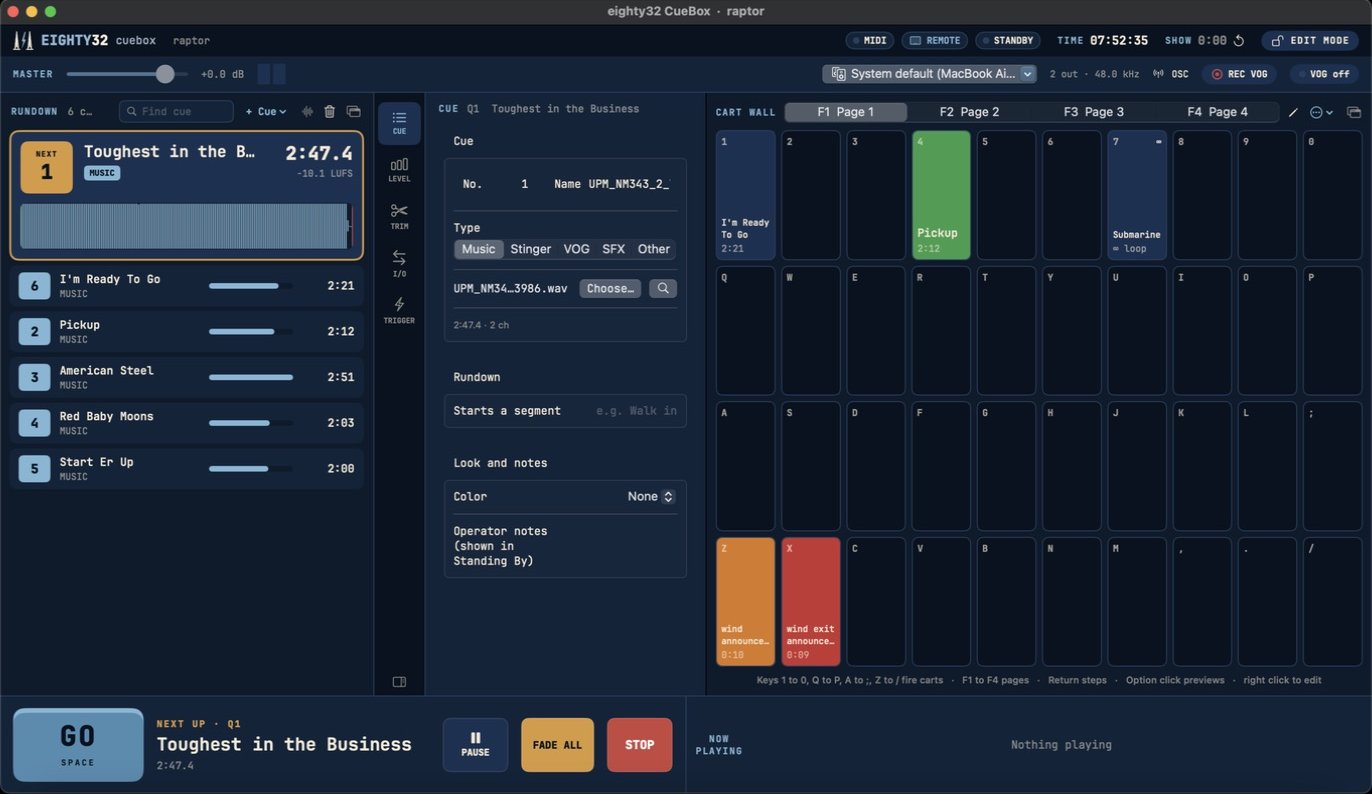
What's in the box
Rundown and GO
Big next up card, played and upcoming rows, segments, pre and post waits, fade cues and devamp.
Cart wall
Four pages of 40 hot buttons on your keyboard. Linked carts, exclusive groups, buzzer lockout, hold to play, step cursor.
Any output
Up to 128 outputs, Dante friendly, per cue routing, per output trim and delay, a preview output for your headphones.
Ducking and VOG
Music dips under the announcer from a live mic or the desk. Record a VOG on the fly and it lands trimmed and leveled.
Yamaha console link
CL, QL, Rivage PM and DM7: scene link both ways, console cues, GO from a desk key, scribble strips.
Spatial audio
Speaker map panning, movement paths, binaural headphone monitor, and position out to L-ISA, Soundscape and Spacemap Go.
Show control
MIDI, MSC, OSC, timecode chase, time of day cues, a phone remote, Stream Deck and plain text control for Q-SYS or Crestron.
Hot standby
A second Mac follows every GO and edit, and throws a big MAIN LOST banner if the main goes quiet.
Line check and walk in
Voice idents on every output, tones and pink noise, a Play Stack for walk in music, and a library browser.
Requirements
A Mac on macOS 14 Sonoma or newer, Apple silicon or Intel. Any CoreAudio output, including Dante Virtual Soundcard.